How to Search UK Company Career Pages Directly
Job boards show a fraction of UK vacancies. How to search employers' own career pages directly, recognise the system behind them, and run a weekly routine.
Quick answer
Job boards carry a subset of UK vacancies, and the subset is chosen by what employers chose to pay to advertise. The fuller list sits on each employer's own career page. The efficient method is to work in the opposite direction from most job seekers: build a shortlist of employers first, find each one's career page, learn the handful of systems those pages run on, then check them on a schedule with a site-restricted search rather than opening thirty tabs. It takes an hour to set up and about twenty minutes a week to run.
Key takeaways
- Employers post to their own career page first and to job boards selectively.
- Most UK career pages run on one of a small number of recruiting systems, and
each has a recognisable URL pattern.
- A site-restricted search engine query reaches those pages faster than
navigating each site.
- Shortlist first, search second. Searching by keyword across the whole internet
produces adverts; searching a shortlist produces employers.
- Direct applications give you a cleaner record of who you applied to and when.
- A sponsor licence is permission to sponsor, not a promise to sponsor any role
or any person, so a career page never answers the sponsorship question on its own.
Why job boards are an incomplete picture
A job board is an advertising product. An employer decides, role by role, whether to pay to promote a vacancy there. Some never do. Some do it only when an internal search has stalled. Aggregators fill part of the gap by scraping career pages, but they scrape imperfectly, lag by days, and often strip the detail that matters — the full duties list, the salary band, the wording about right to work.
The practical consequences for an international candidate are specific:
- Roles appear on the career page days before they appear anywhere else.
- Salary and duties are more complete on the original posting.
- Sponsorship wording, when it exists, is usually in the original text and
frequently missing from the syndicated copy.
- Applying through the original posting avoids duplicate applications, which
recruiters notice.
None of this makes job boards useless. It makes them the second place to look rather than the first.
Build the shortlist before you search
The instinct is to search "data analyst London sponsorship" and see what comes back. That produces adverts, most of which will not survive a first read.
The alternative produces employers, and employers keep producing roles.
- Start from the official Register of Licensed Sponsors: Workers, which lists
organisations permitted to sponsor workers, with their town, county, licence rating, and routes Source: GOV.UK — Register of licensed sponsors: workers. Our copy of the file, published as of 11 August 2026, holds 127,672 organisations.
- Filter it down to your sector and the regions you would actually move to.
- Keep thirty to sixty names. Fewer than thirty and you starve; more than sixty
and you will not maintain it.
- For each, find the career page once and save the URL.
That last step is the work. Do it once and the weekly routine becomes fast. Our guide to finding UK jobs that sponsor visas covers how to build the shortlist itself.
Finding the career page
Three reliable routes, in order of speed:
- The footer. Almost every UK company site has "Careers", "Jobs", or "Work
with us" in the footer.
- A site-restricted search. In any search engine, type
site:example.com careers. It surfaces the page even when the navigation hides it.
- The recruiting system directly. If you know which system the employer
uses, its hosted URL is often predictable — covered below.
Save the URL that lists all open roles, not the marketing page about company culture. Those are different pages, and only one of them is useful weekly.
The systems behind most career pages
Most UK employers do not build their careers page from scratch. They use a recruiting platform, and the public pages it generates have recognisable URLs.
These are employer-side systems, not products a job seeker buys or installs. The notes below describe how their public pages behave. This page does not review, rank, or recommend any of them.
| System | Typical public URL shape | What to know |
|---|---|---|
| Greenhouse | boards.greenhouse.io/<company> or job-boards.greenhouse.io/<company> | Clean per-company list; individual jobs have stable URLs |
| Lever | jobs.lever.co/<company> | Simple list, often with department filters |
| Workday | <company>.wd3.myworkdayjobs.com/... | Large employers; filters live in the left rail |
| SmartRecruiters | jobs.smartrecruiters.com/<company> | Common in retail, hospitality, and services |
| Ashby | jobs.ashbyhq.com/<company> | Common among newer technology companies |
| Workable | apply.workable.com/<company> | Common with small and mid-size employers |
| Teamtailor | <company>.teamtailor.com | Common in Nordic-founded and scale-up employers |
| Oracle / Taleo / iCIMS | Long parameterised URLs | Older enterprise and public-sector deployments |
You do not need to memorise this. You need to recognise it once per employer, so that your saved link goes to the page that actually updates.
Why the system matters at all
Two practical reasons.
Search behaviour. A hosted board is usually indexed by search engines, which means you can search across it. site:jobs.lever.co "data engineer" London returns roles across every company on that platform. The same works for the other hosts.
Filters. Enterprise systems tend to have proper location and category filters; small hosted boards often have none, and a browser find-in-page is faster than clicking.
Search patterns worth saving
Adapt these to your role and location:
site:boards.greenhouse.io "your role" Londonsite:jobs.lever.co "your role" UKsite:jobs.ashbyhq.com "your role" remotesite:example.com/careers "your role"for a single employersite:example.com "no sponsorship"to find an employer's standing wording
That last one is underused. Employers are often consistent in how they phrase right-to-work requirements across postings, so one search of their own domain can tell you the house style before you read a single advert. What that wording means is covered in our guides to job ads that rule out sponsorship and to "UK candidates only".
The weekly routine
Set aside one slot a week. Twenty minutes is realistic for sixty employers once the links are saved.
- Open your shortlist.
- Work down it, checking each career page for new postings since your last run.
- For anything new, run the ninety-second read: salary, wording, advertiser,
location, likely occupation code, posting date. Our guide to reading a UK job ad sets out the order.
- Log every role you decide to apply for, with the date and the URL.
- Log the ones you rejected and why. Six weeks later you will not remember, and
you will otherwise re-read the same advert twice.
Alerts, and their limits
Most hosted boards offer email alerts, and search engines offer saved-search alerts. Both help and neither is sufficient: alerts miss re-postings, silently break, and often fire days late. Treat alerts as a supplement to the weekly run, not a replacement.
Reading a direct posting properly
The original posting usually carries more detail than any copy of it. Read for four things in particular:
The salary band. Direct postings quote bands more often than syndicated copies. Assume the bottom of the band until an employer says otherwise.
The duties. These are what determine the likely occupation code, which in turn drives the going rate under the Skilled Worker rules. Titles are a weak signal; duties are a strong one.
The right-to-work wording. Silence is not the same as a "no". A statement that the employer cannot sponsor is a fact worth respecting; no statement at all means you still have to check the employer's licence.
The posting date. Career pages often keep roles live long after they have been filled, and some employers run permanently open "evergreen" postings for high-turnover roles. A role that has been up for three months is a weaker use of your time than one posted last week.
Traps to avoid
Evergreen and pipeline postings
"General application", "Talent pool", "Future opportunities" — these collect CVs rather than fill a specific vacancy. They are not worthless, but they should never occupy a slot you would otherwise give to a live role.
Duplicate applications
If you apply through a job board and then again through the career page, recruiters see two applications from the same person. Pick the original posting and use it.
Confusing the advertiser with the employer
If a career page is an agency's, every role on it belongs to a client. That changes what any research about the advertiser can tell you — our guide to agencies versus direct employers covers the difference.
Treating a career page as evidence about sponsorship
This is the important one. A company career page tells you what roles are open. It does not tell you whether the organisation holds a sponsor licence, and a page that says nothing about sponsorship says nothing about sponsorship. The official register is the source for the licence question, and even there, a licence is permission to sponsor, not a promise to sponsor any role or any person.
Where sponsorship checks fit in the routine
Do them at two moments, not continuously:
- When an employer joins your shortlist. Check the register once, note the
name you found, the rating, the routes, and the date.
- Before you invest real time — a take-home task, a panel day, annual leave
for an interview. Check again. The register file updates almost daily.
Between those two moments, spend your attention on the applications rather than on re-checking. The underlying GOV.UK register remains free to search. Sponsor Check adds in-browser matching and includes ten distinct-employer checks before its paid unlimited unlock; repeated checking is not the same as progress.
A worked example
The employers below are invented for illustration.
You are a mechanical engineer targeting the Midlands.
- From the register you pull twelve engineering and manufacturing organisations
in Warwickshire, Staffordshire and the West Midlands with A-rated Skilled Worker entries, noting the date of the file.
- For each, you find the careers page. Seven run on hosted boards, three on
Workday, two on their own site.
- You save the twelve URLs in a single note, with the register details next to
each name.
- Each Monday you run the list. In week one there are two new roles; in week
three there are five; in week four, none.
- Over six weeks the list produces eleven live roles, of which you apply to six.
A generic keyword search over the same period would have surfaced perhaps two of them, because the rest were never advertised off-site.
The point of the example is not the numbers, which vary by sector. It is the shape: a fixed list, checked on a rhythm, producing a steady flow rather than a scramble.
Keeping the shortlist alive
A shortlist decays. Employers get acquired, freeze hiring, move their careers page to a different system, or turn out to hire only in a city you would not move to. A list built in March and never revised is producing less by June, and the drop is invisible because nothing announces it.
Two habits keep it healthy.
Retire employers deliberately
Once a month, look at the names that have produced nothing. An employer belongs on the list if it is plausibly hiring for your occupation at a level that clears the salary rules. If three months have passed with no relevant role at all, move it to a "dormant" section rather than deleting it — you may want the research later, and re-finding a careers page is wasted work.
Reasons to retire a name:
- No relevant vacancy in three months.
- Every posting has been at a level well below your target salary band.
- The careers page has not changed at all, which sometimes means it has moved.
- The organisation's register row has gone, which is worth noting with a date.
Add employers from what you see
New names come from three reliable places: the register itself when you widen a region or sector, the "similar companies" sections on employer profiles, and the credits on work you admire — suppliers, partners, and clients named in case studies are all employers.
A good rhythm is two names retired and three added each month. The list stays roughly the same size, and its composition improves.
Record the same fields for every employer
Consistency matters more than detail. Four fields are enough:
| Field | Why |
|---|---|
| Legal name as it appears on the register | Brand names do not match the file |
| Careers page URL | The list page, not the culture page |
| Register details and the date you checked | Your only history; nothing public keeps one |
| Last relevant role seen, and when | Tells you when to retire the name |
That table is the difference between a shortlist and a folder of bookmarks.
The bottom line
Search employers, not adverts. Build a shortlist from the official register, find each employer's career page once, learn to recognise the handful of systems those pages run on, and check them on a weekly rhythm with saved site-restricted searches. You will see roles earlier, read them in full, and waste less time on postings that were never live.
What the method cannot do is answer the sponsorship question. That comes from the register, and even there the register shows a licence, never an intention. A licence is permission to sponsor, not a promise to sponsor any role or any person.
This page is information, not immigration advice. This site is not affiliated with the Home Office or GOV.UK. For your own circumstances, check GOV.UK or speak to an adviser registered with the Immigration Advice Authority or a regulated solicitor.
Frequently asked questions
Are all UK jobs posted on job boards?
No. Employers choose which roles to advertise off-site and which to keep on their own career page. The career page is generally the fuller list and updates first.
How do I search a specific company's jobs?
Use a site-restricted query in any search engine: `site:example.com careers`, or `site:example.com "job title"`. If the employer uses a hosted board, search that host instead.
What is Greenhouse, Lever, or Workday?
They are recruiting systems that employers use to publish vacancies and manage applications. As a candidate you interact only with the public job pages they generate.
How do I know which system an employer uses?
Look at the URL when you click "apply". A jobs page hosted on a `greenhouse.io`, `lever.co`, `myworkdayjobs.com`, `ashbyhq.com`, `workable.com` or similar domain tells you immediately.
Can I search across all companies using one system?
Often, yes. A site-restricted search such as `site:jobs.lever.co "role" London` returns matching roles across the companies hosted there, subject to what search engines have indexed.
Is applying directly better than through a job board?
Applying through the original posting avoids duplicate applications and usually gives you the full advert text. Whether it changes an outcome is not something any source can tell you.
How often should I check career pages?
Once a week is enough for most shortlists. More frequent checking rarely surfaces more and tends to crowd out the actual applications.
Do career pages say whether an employer sponsors?
Sometimes, in the right-to-work wording of an individual advert. Often they say nothing at all. Silence is not an answer, and the official register is where the licence question gets settled.
What is an evergreen posting?
A vacancy kept permanently open to collect applications for a role the employer hires for continuously. It is not a specific opening, so treat it as a lower priority than a dated posting.
Should I apply to "general application" pages?
They are low cost and low yield. Use them when you have run out of live roles at an employer you genuinely want, not as a substitute for applying to real vacancies.
How many employers should be on my shortlist?
Thirty to sixty works for most people. Below that the flow of new roles is too thin; above it the weekly run stops happening.
How do I keep track of what I have already seen?
Log every role with its date and URL, including the ones you rejected and the reason. The rejection log saves more time than the application log.
Do recruiters mind if I apply to several roles at one company?
Applying to two or three genuinely relevant roles is normal. Applying to everything they have posted is visible in their system and reads as undifferentiated.
Does this method work outside the UK?
The systems are international, so the URL patterns and search operators work anywhere. The sponsorship checks on this page are specific to the UK.
Last reviewed 2026-08-08 by Visa Ready UK Editorial Team. Figures on this page are checked against GOV.UK on the review date. Rules, fees, and salary floors change — always confirm against GOV.UK before you act. Spotted an error?
Check the employer without leaving the job advert
- See the legal sponsor name, town, routes, rating, and close matches on the page.
- Your checks and job-page text stay on your computer; the extension makes no network requests.
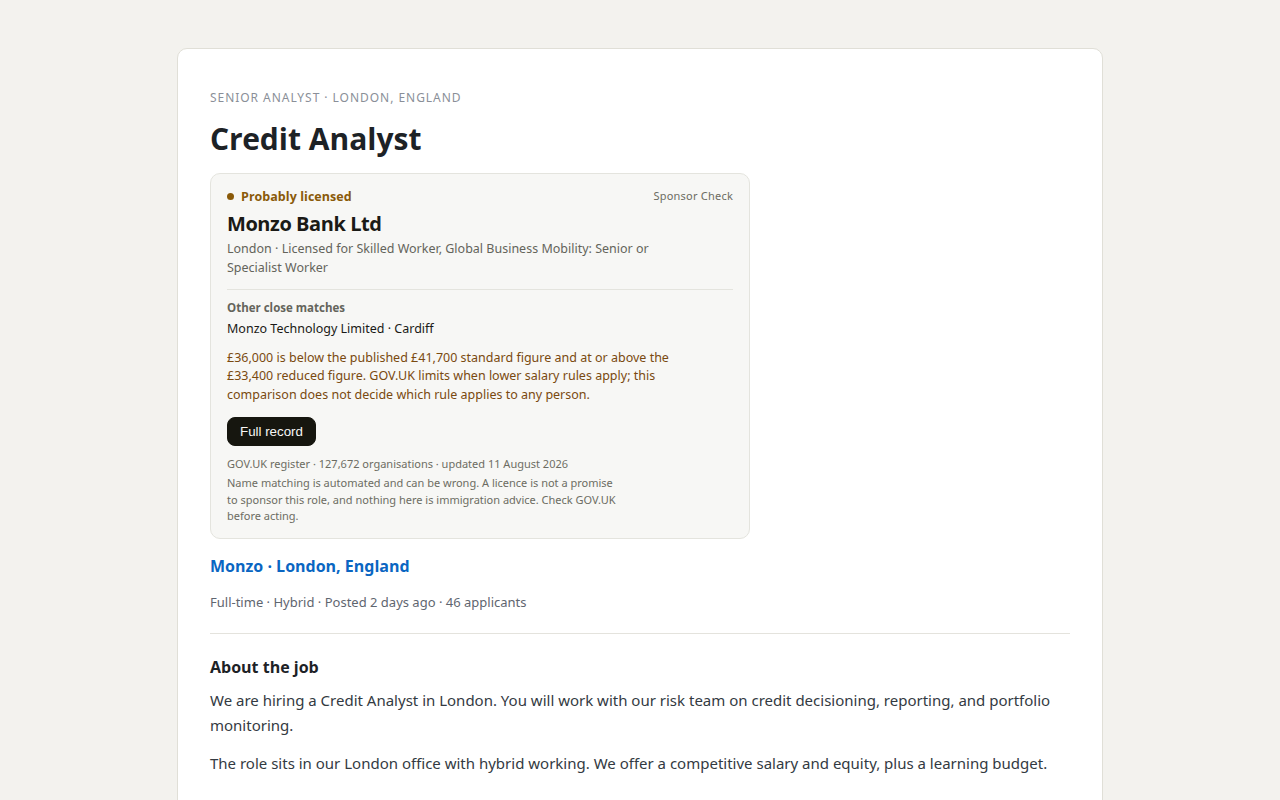
Our product. Sponsor Check is the browser extension sold by THINKINGAI LIMITED, the company identified in this site's footer. The register itself remains free, official, and public. This site is information only, not immigration advice.