How to Find Sponsor-Licensed Employers on LinkedIn
A repeatable LinkedIn method for international candidates: build a shortlist from the sponsor register, set company alerts, then verify every employer.
Quick answer
LinkedIn has no sponsorship filter, and searching the phrase "visa sponsorship" mostly returns ads that mention sponsorship in order to rule it out. The method that works runs the other way round: build a shortlist of licensed employers from the official GOV.UK register of licensed sponsors, follow those companies on LinkedIn, and set alerts against them rather than against a keyword. Then verify each advertiser on the ad itself, because a LinkedIn company page shows a brand name and the register lists a legal name. A licence is permission to sponsor, not a promise to sponsor a particular role or person.
Key takeaways
- There is no "offers sponsorship" filter on LinkedIn, and keyword searches
for sponsorship are unreliable in both directions.
- Start from the register, not the feed. The register is the official list of
organisations permitted to sponsor; LinkedIn is where some of their roles get advertised.
- Company-based alerts beat keyword-based alerts for sponsorship-dependent
searches.
- Brand names on LinkedIn rarely match legal names on the register, and that
gap is where most self-checks fail.
- LinkedIn tells you who is advertising. It cannot tell you whether a specific
role will be sponsored.
Why the obvious LinkedIn search fails
The keyword trap
Type "visa sponsorship" into LinkedIn job search and you get three kinds of result, only one of which is useful:
- Ads that say sponsorship is not available. These use the phrase and
dominate the results.
- Ads from agencies using the phrase to attract international applicants
without any specific sponsored role behind it.
- Ads from employers who genuinely mention sponsorship. A minority.
The phrase is present in all three. A keyword search cannot distinguish between "we sponsor" and "we do not sponsor" because both contain the word, and negation is exactly the thing free-text search handles worst. We covered the wording patterns in detail in our guide to job ads that rule out sponsorship.
The silence problem
The larger issue is what is missing. Most job adverts say nothing about sponsorship at all. An employer that holds a licence and sponsors routinely often does not mention it in an advert, because the advert is written for the domestic market and sponsorship is handled after shortlisting. Those roles are invisible to a sponsorship keyword search — and they are the roles you actually want.
So the keyword search over-returns the roles that exclude you and under-returns the roles that do not. That is a filter working backwards.
What LinkedIn does not have
LinkedIn's job filters cover things like date posted, experience level, company, job type, remote or on-site, and salary where the employer supplies it. What the platform has never had is a filter for "this employer holds a UK sponsor licence", because that fact does not live on LinkedIn. It lives in a file published by the Home Office Source: GOV.UK — Register of licensed sponsors: workers.
No amount of clever searching on LinkedIn creates data that is not on LinkedIn. The workaround is to bring the data with you.
The method: register first, LinkedIn second
Step 1 — build the shortlist off-platform
Open the GOV.UK register of licensed sponsors and filter it down to something you can actually work with. The file lists organisation name, town or city, county, licence type and rating, and route. A workable shortlist is usually built by:
- Sector. The organisations doing the kind of work you do.
- Region. Where you are willing to live and work.
- Route. Whether the entry covers the route relevant to your situation.
- Rating. An A rating and a B rating mean different things, and the
difference matters when you are choosing where to spend applications.
Twenty to sixty organisations is a realistic first pass. Fewer than twenty and you will run out of open roles; more than a hundred and you will not maintain it.
Step 2 — find each one on LinkedIn
Search each shortlisted organisation by name in LinkedIn's company search, and follow the page. Following is the mechanism that matters: it puts the company's posts and, in many cases, its job activity within reach, and it gives you a durable list you can return to.
Two things to check while you are on the page:
- The About tab. Company size, headquarters, industry, and often a
registered or legal-sounding name that helps you match the LinkedIn page to the register entry.
- Affiliated or related pages. Large organisations run separate pages per
country, brand, or subsidiary. The UK entity is the one that matters, and it is frequently not the page with the most followers.
Step 3 — turn the shortlist into alerts
This is the step that converts research into a repeatable habit. Instead of one alert on a sponsorship keyword, create alerts scoped to your shortlisted companies and your role type. Company-scoped alerts have a property the keyword alert does not: everything they surface is already from an employer you have confirmed is on the register.
Practical settings that hold up over months:
- Frequency. Daily for a small shortlist; weekly once the list grows past
roughly forty companies, or the volume stops being readable.
- Role scope. Two or three role titles, not one. Titles vary far more than
duties do.
- Location. Set it wider than your ideal. Regional roles are less
contested than London ones.
Step 4 — verify on the advert
An alert is a lead, not a confirmation. Before applying, check the actual advertiser on the ad. Our guide to recruitment agencies versus direct employers explains why: the organisation advertising is not always the organisation that would sponsor, and only one of them appears on the register.
The name-matching problem
Brand name in, legal name out
The register lists organisations by legal name. LinkedIn lists them by brand. Those are different strings far more often than people expect:
- A retailer trading under a short brand name may be registered as a longer
entity name with a suffix.
- A group may hold the licence at a parent entity while advertising under a
divisional brand.
- A company may have been renamed after an acquisition while the register
entry still carries the older legal name, or the reverse.
- A UK subsidiary may hold the licence while the LinkedIn page is the global
parent.
A search for the brand name returns nothing, and "nothing" gets misread as "not licensed". That single misreading removes good employers from more shortlists than any other error.
How to close the gap
- Search the distinctive word, not the whole name. One unusual word
matches more reliably than an exact string.
- Try the legal-entity variants. Add and remove suffixes such as Ltd,
Limited, Group, Holdings, and UK.
- Check Companies House for the registered name of the UK entity, then
search the register for that name.
- Look at the careers page footer. The legal entity name and company
number are usually printed there, or in the privacy notice.
- Read the ad for the employing entity. Contracts of employment name a
legal entity; adverts sometimes do too.
Where a browser checker fits
Some candidates run a checker extension that reads the employer name on the job page and matches it against the register while they browse, returning either a licensed match, a set of close candidates, or no match at all. That turns a five-minute manual lookup into a glance, which matters when a shortlist produces thirty adverts a week. The underlying register data is the same public file either way, and the register lookup is free — the tool changes the speed, not the answer Source: GOV.UK — Register of licensed sponsors: workers.
Whatever you use, keep the habit: a name that does not match on the first attempt is a research task, not a verdict.
Searching LinkedIn well
Quoted phrases and search syntax
LinkedIn's search behaviour differs between job search, people search, and company search, and the supported syntax has changed more than once. Two practical rules survive those changes:
- Quoted phrases are the most reliable operator. Searching a quoted job
title returns tighter results than the same words unquoted.
- Test before you trust. Run a search you already know the answer to. If
an operator is being ignored, you will see it immediately in results that are too broad.
LinkedIn's own help centre is the source of truth for what its search supports at any given moment Source: LinkedIn Help Centre. Treat any blog post claiming a definitive operator list — including the general guidance here — as something to verify against the current product.
Searching people, not just jobs
People search is underused by candidates and is often more productive than job search for a sponsorship-dependent hunt. Once you have a shortlist of licensed employers, you can find the people who hire for your function at those organisations: hiring managers, team leads, and internal recruiters.
The value is not "networking" in the abstract. It is that a two-line message to a named person at a confirmed licensed employer produces a factual answer faster than a form submission does:
Hello [name] — I am applying for the [role] position at [company] and wanted to check one factual point before I do: would this role be open to a candidate who needs sponsorship under the Skilled Worker route? Happy to be told no; it just saves us both time.
Direct, answerable, and it does not ask anyone for a favour. Our guide to asking about sponsorship at interview covers timing and phrasing in more depth.
Reading a LinkedIn job post properly
Before you spend an application, read the post for four things:
- Who posted it. A named recruiter at an agency is a different situation
from a company page posting its own role.
- Where it applies. An application that stays inside LinkedIn and one
that hands you to a company careers site tell you different things about how the employer runs hiring.
- The stated location and work pattern. Remote-friendly wording does not
settle which legal entity would employ you, and the entity is what carries the licence.
- The salary, if shown. Salary is a fast filter, and most sponsorship
failures are salary failures rather than licence failures.
Our guide to reading a UK job ad sets out the full pass-by-pass method.
A weekly routine that survives contact with reality
The rhythm
- Monday, 20 minutes. Clear the alert backlog. Delete anything from an
employer not on your shortlist and anything that fails the salary filter.
- Tuesday, 40 minutes. Verify the survivors: employer name against the
register, advertiser type, entity.
- Wednesday, 60 minutes. Apply to the three that fit you closest.
Tailored, not bulk.
- Thursday, 20 minutes. Two people-search messages to named contacts at
licensed employers with live roles.
- Friday, 15 minutes. Update the tracker. Add any new licensed employer
you came across; remove any company that has gone quiet for a quarter.
Why a routine outperforms intensity
A sponsorship-dependent search is a long research project with a low daily hit rate. The failure mode is not laziness; it is a burst of eighty applications in a fortnight followed by a month of nothing. Three verified applications a week to licensed employers beats thirty unverified ones, because the unverified thirty include employers who were never able to sponsor in the first place.
Maintaining the shortlist
The register changes almost daily as organisations are added and removed. Re-check your shortlisted employers on a schedule — monthly is enough for most searches — and note the date you checked next to each name. A shortlist checked in March and used in August is a list of assumptions.
What LinkedIn cannot tell you
Even a well-run LinkedIn process leaves real gaps:
- Whether a specific role carries sponsorship. A licence is permission to
sponsor. The decision on any particular vacancy sits with the employer and is usually made after shortlisting.
- Whether the advertising entity is the licensed entity. Group structures
and agency postings both break that assumption.
- Whether the ad is current. Reposted and stale listings are common on
every board.
- Whether the salary meets the route requirements. Advertised ranges are
not offers, and the requirement depends on the occupation and your circumstances.
- Anything about your eligibility. That is a question for GOV.UK or a
regulated adviser, not a job board.
Common mistakes
- Searching the sponsorship keyword and stopping there. It returns the
exclusions and misses the silent majority.
- Following the global parent page instead of the UK entity. The licence
sits with a specific organisation.
- Reading "no register match" as "not licensed" without trying legal-name
variants.
- Setting one alert, too narrow. Titles vary; duties do not.
- Applying before checking the advertiser. Agency ads need a different
set of questions.
- Letting the shortlist go stale. Register entries change; undated
research expires.
- Treating a licensed employer as a likely sponsor. Permission and
intention are different things, and only one of them is published.
The bottom line
LinkedIn is a distribution channel, not a source of truth about sponsorship. Use the official register to decide who is worth watching, use LinkedIn to find out when those employers are hiring, and verify the advertiser on every ad before you spend an application. That order — register, then platform, then verification — turns an unpredictable feed into a maintained shortlist. It still will not tell you whether a particular employer will sponsor a particular role, because a sponsor licence is permission to sponsor rather than a promise to sponsor anyone. This page is information, not immigration advice; for your own circumstances, check GOV.UK or speak to a regulated adviser.
Frequently asked questions
How do I find visa sponsorship jobs on LinkedIn?
Build a shortlist of licensed employers from the GOV.UK register, follow those companies on LinkedIn, and set job alerts scoped to them and your role types. Then verify the advertiser on each ad before applying.
Does LinkedIn have a visa sponsorship filter?
No. LinkedIn's filters cover things like date, experience level, location and job type. Sponsor licence status is published by the Home Office, not by LinkedIn, so it has to be brought in from the register.
Why do sponsorship keyword searches return so many irrelevant jobs?
Because ads that rule sponsorship out contain the same words as ads that offer it, and free-text search does not handle negation. Most ads say nothing about sponsorship at all, so the keyword also misses the roles worth finding.
Can I trust a "sponsors visas" label on a job board?
Treat it as a signal to check, not a fact. The official position is what the GOV.UK register says about the employing organisation on the day you look.
Why can I not find a company on the sponsor register?
Usually because the register lists the legal entity name and the job ad shows a brand name. Try the distinctive word on its own, try entity suffixes, and check Companies House or the careers page footer for the registered name.
Should I message recruiters on LinkedIn about sponsorship?
A short, factual question to a named person at a licensed employer is reasonable and often answered quickly. Ask one specific question and make it easy to answer with a yes or a no.
How many companies should be on my shortlist?
Twenty to sixty is workable for most searches. Small lists run dry; very large lists stop getting maintained, and an unmaintained list is worse than a short one.
How often should I re-check my shortlist against the register?
Monthly is enough for most searches. The register updates almost daily, so record the date you checked each employer and treat older checks as provisional.
Do LinkedIn Boolean operators still work?
Support has changed over time and differs between job, people and company search. Quoted phrases are the most dependable. Check LinkedIn's help centre for the current behaviour and test any operator on a search whose answer you already know.
Is LinkedIn Premium worth it for a sponsorship-focused search?
It changes what you can see and how you can message, not whether an employer holds a licence. Decide it on messaging and visibility grounds; it adds nothing to the register question.
What should I do when an ad does not mention sponsorship at all?
Treat silence as neutral. Check whether the employer is on the register, check whether the salary is plausible for the role, and ask the question directly if both look workable.
Does following a company on LinkedIn improve my chances?
It improves what you see, not how you are assessed. The point of following is to build a durable, verified list of employers whose roles reach you.
Can an extension check employers for me while I browse LinkedIn?
Some browser extensions match the employer name on a job page against the register and show the result on the page. The register data is public and free either way; a tool changes how quickly you get the answer, not what the answer is.
Is any of this immigration advice?
No. This is information about how to search a job board and how to use a public register. Eligibility, route, and application questions belong with GOV.UK or a regulated adviser.
Last reviewed 2026-08-08 by Visa Ready UK Editorial Team. Figures on this page are checked against GOV.UK on the review date. Rules, fees, and salary floors change — always confirm against GOV.UK before you act. Spotted an error?
Check the employer without leaving the job advert
- See the legal sponsor name, town, routes, rating, and close matches on the page.
- Your checks and job-page text stay on your computer; the extension makes no network requests.
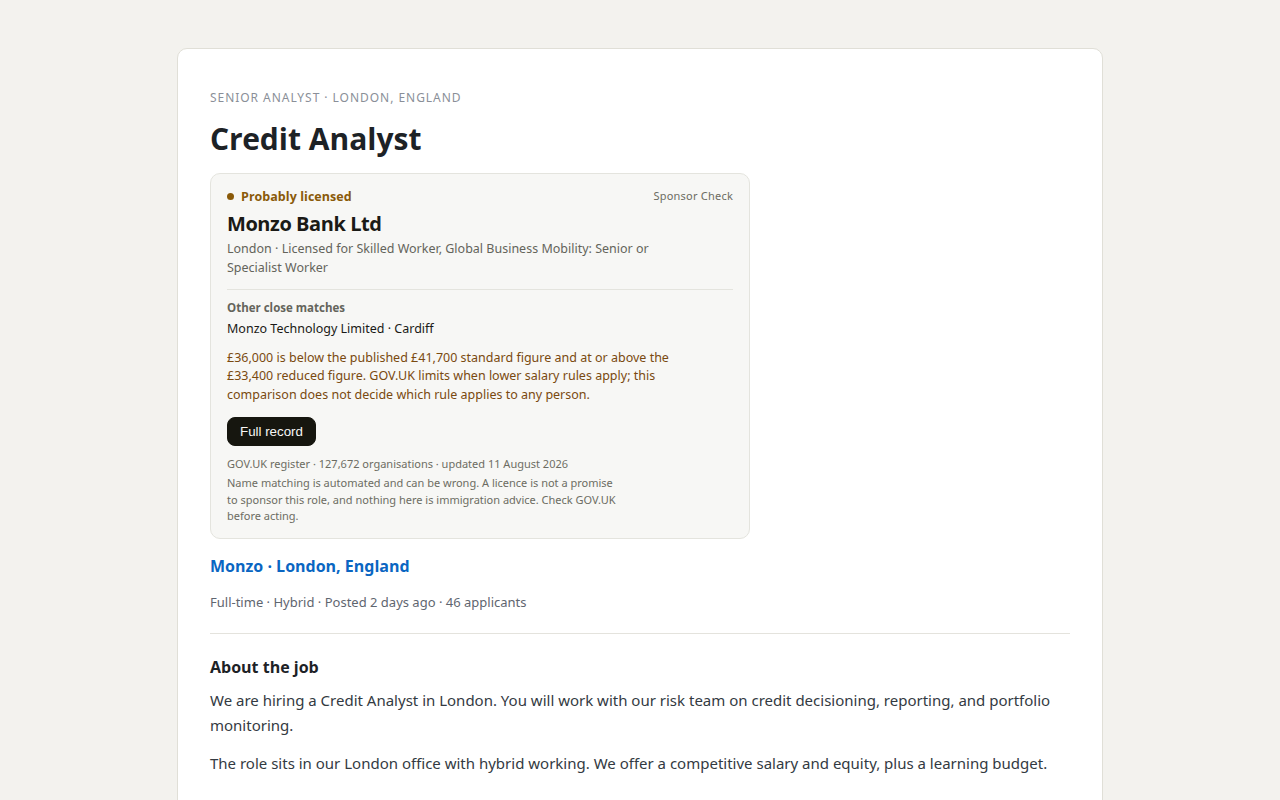
Our product. Sponsor Check is the browser extension sold by THINKINGAI LIMITED, the company identified in this site's footer. The register itself remains free, official, and public. This site is information only, not immigration advice.